The ACF color picker is awesome. It uses the built-into-wordpress Iris plugin from Automattic. Iris (wpColorPicker) is really flexible and allows for lots of customization.
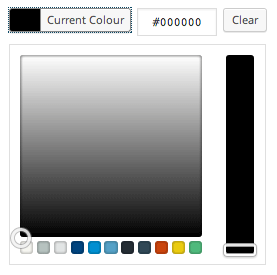
By default, Iris spits out a color palette at the bottom of the picker for quick selection. If you’re working with a client that has an established set of brand colors that they’d like to maintain throughout their sites, you can add a custom color palette to the Iris color picker very easily.
You can add your custom palette with a few lines of JS and PHP. In functions.php, you’ll first want to enqueue a javascript file.
functions.php
/*
 * Enqueue ACF field scripts.
 */
function my_acf_admin_enqueue_scripts() {
 wp_enqueue_script( 'my-acf-script', get_template_directory_uri() . '/assets/js/acf.js', 'acf-input', '1.0', true );
}
add_action('acf/input/admin_enqueue_scripts', 'my_acf_admin_enqueue_scripts');
There are a couple components to this code that are specific to ACF. The action hook used is ACF specific, so it is run with all the other ACF scripts. Additionally, the third parameter in wp_enqueue_script() tells WordPress that the JS file being queued up is dependant on an ACF JS file. The handle acf-input refers to the primary ACF script that initializes all ACF inputs, and more specifically, the iris/wpcolorpicker object that we’ll be modifying.
Create your acf.js file with the following lines:
acf.js
/*
 *  Provides additional ACF functionality.
 */
jQuery(document).ready(function($) {
	if( acf.fields.color_picker ) {
		$(document).on('acf/setup_fields', function(e) {
			var palette = [#ffffff,#000000];
			$(acf.fields.color_picker.$input).iris('option', 'palettes', palette);
		});
	}
});
Again, lots of ACF specific things happening here. ACF uses wp_localize_script() to send PHP variables to JS for use within scripts. The ACF object will contain the color_picker object only if one has been instantiated, so our code will run only if that’s the case.
Next, we setup an event listener for the ‘acf/setup_fields’ event. This event is triggered in input.js, and is used to initialize various fields. This event must be used, because iris needs to be instantiated before you can modify it.
On line 7, a simple array of hex codes is created, and on line 8, a built in Iris method is used to set the color palette. Simply modify the palette array to your own color palette, and you can integrate your clients palette into the color picker field.